Release Notes 3.8.12 (Early Access)
May 5, 2026
We are excited to introduce you to the latest version of Collaborate v3.8.12 (EA). This release includes enhancements and minor bug fixes.
Note
For the best experience, use the browser versions officially tested and verified for this release: Google Chrome (147.0.7727.102), Mozilla Firefox (149.0.2), and Microsoft Edge (147.0.3912.72).
Analyst Portal
Alerts Enhanced
You can now configure alerts using flexible recurrence options such as daily, weekly, on weekdays, monthly, or annually on a specific date, or define a custom recurrence pattern for tailored scheduling. While editing an already scheduled recurring alert, you can choose to apply changes only to the current alert or extend them to all subsequent scheduled alerts.
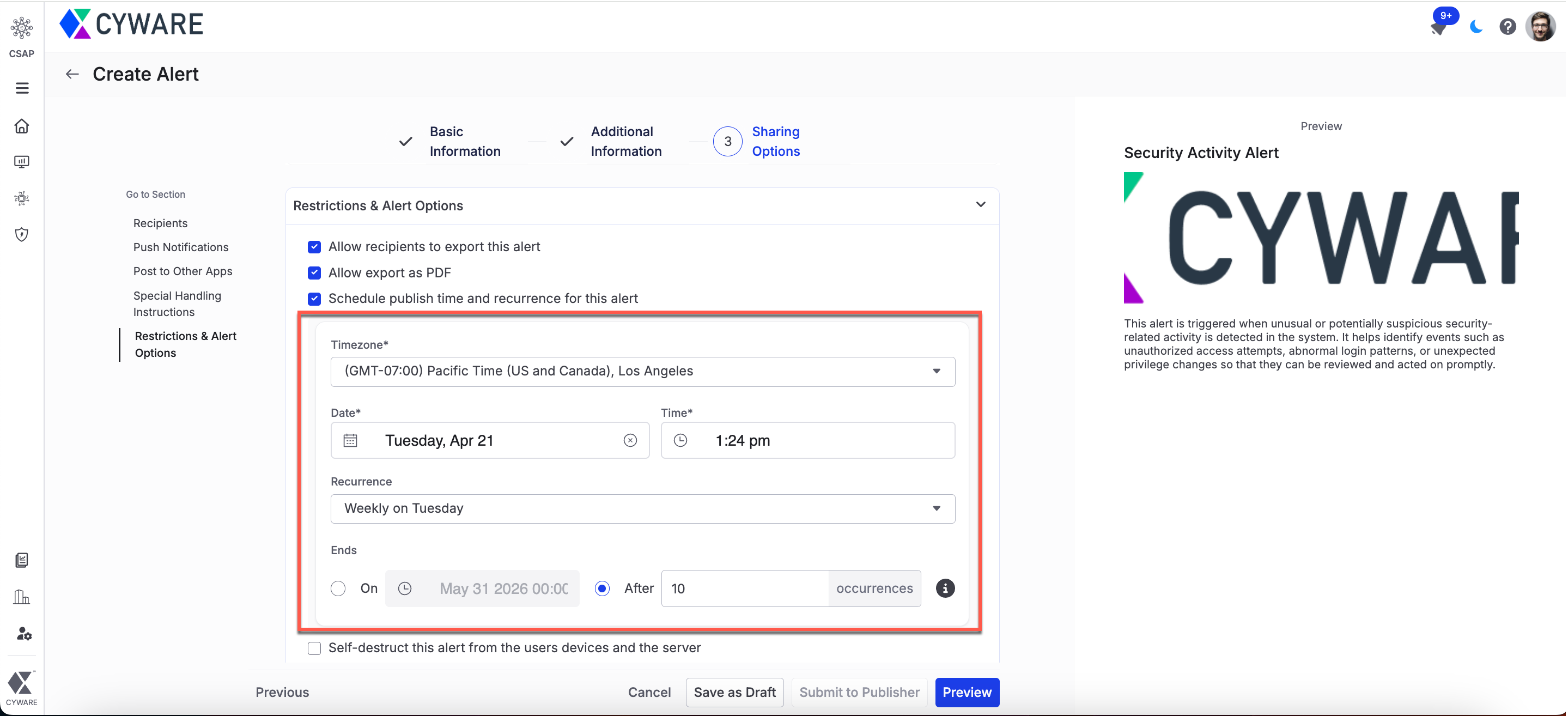
For more information, see Schedule and Configure Alert Recurrence and Edit Alerts.
Edit Alerts Enhanced
You can now add recipients to published alerts, making it easier to manage and update alert sharing in the following ways:
Add recipients from the listing page: Add recipients to a published alert directly from the alerts listing page using the More option and select Add Recipients. You can also configure push notifications for the newly added recipients.
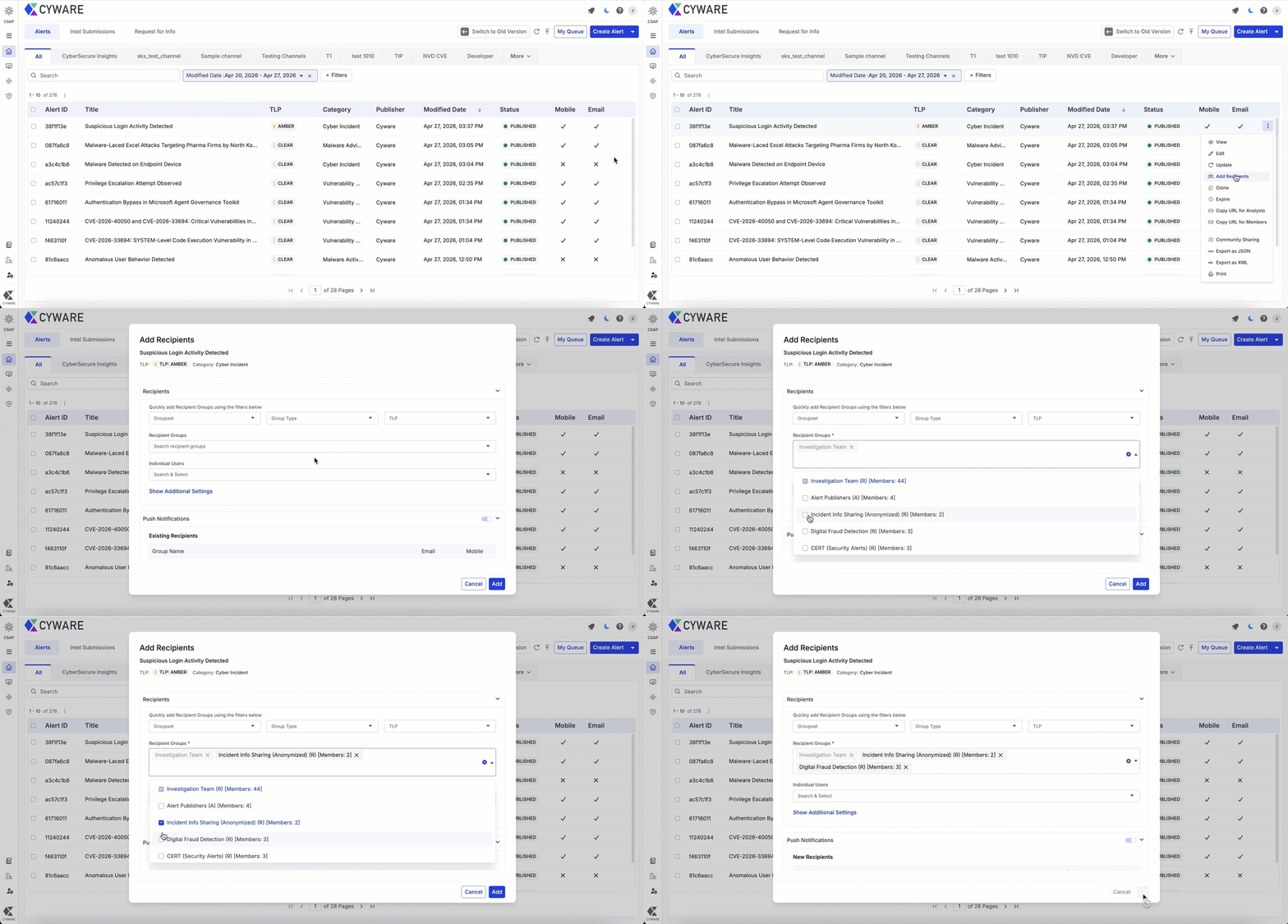
For more information, see Manage Alerts.
Add recipients while editing an alert: While editing an alert, you can now add recipients and configure push notifications, as well as assign threat assessments and recommended actions to newly added recipients.
For more information, see Edit Alerts.
Other Enhancements
Use Microsoft Teams Workflows for channel integration: You can now generate webhook links in Microsoft Teams using Workflows to integrate Teams channels with Collaborate. If your channel uses an Incoming Webhook, update it with a workflow-generated link to ensure uninterrupted alert delivery. For more information, see Configure Microsoft Teams in Collaborate.
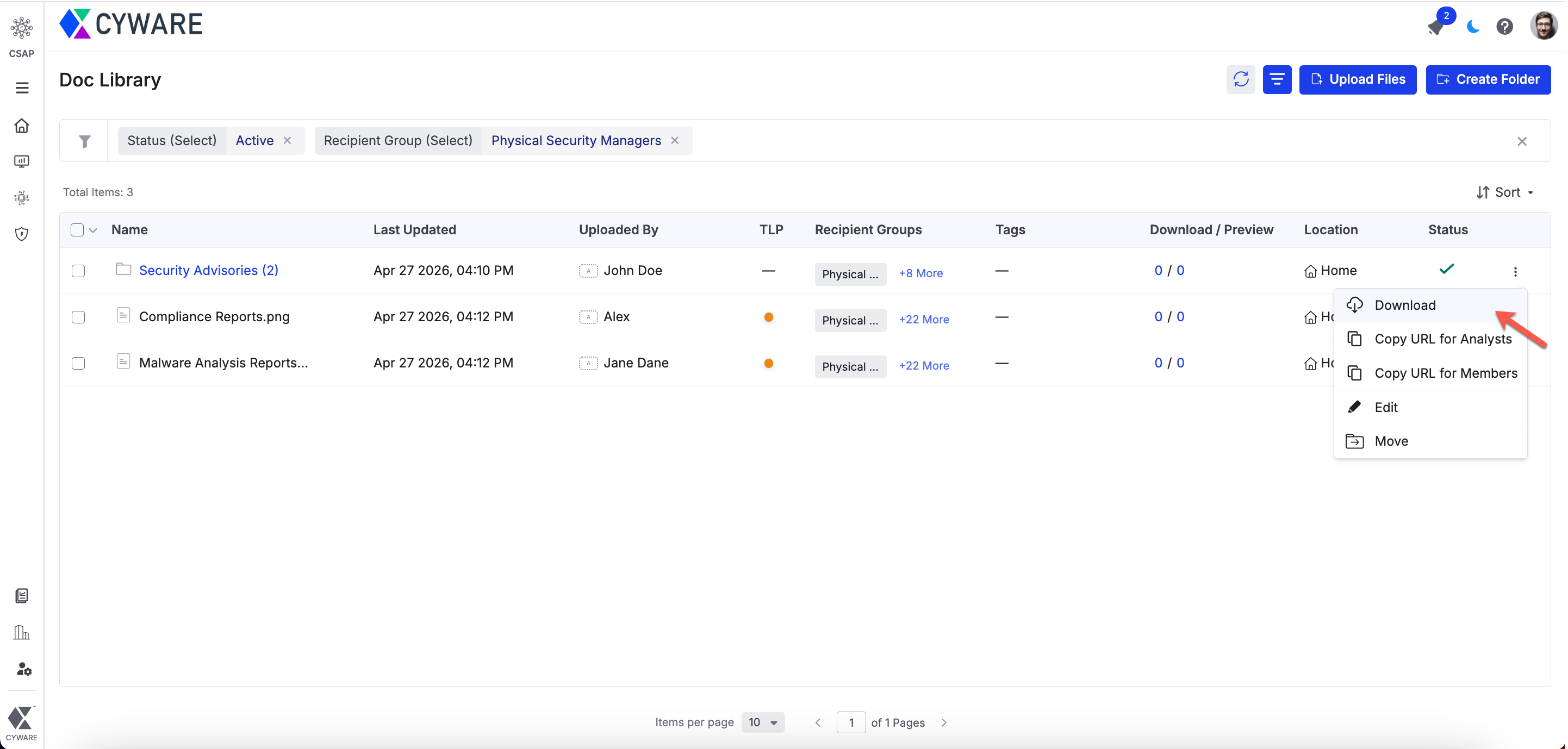
Download Doc Library folders: In Doc Library, you can now download a folder, including its sub-folders and files, as a single ZIP file. The folder structure is preserved within the ZIP file, making it easier to access related documents in one download. After the ZIP is ready, you’ll receive an in-app notification with the download option. For more information, see Manage Doc Library Files and Folders.
The following enhancements are introduced in Community Sharing:
Preserve tags when sharing alerts: Tags are now preserved when alerts are shared across communities.
Auto-create incoming tags: When you receive alerts from another community, new tags that don’t exist in your Tag Library are automatically created. To enable this, turn on the Allow Sharing Communities to Create Tags toggle in Administration > Configuration > Analyst Dashboard. This keeps your Tag Library up to date without manual effort.
For more information, see Configure Analyst Portal Preferences.
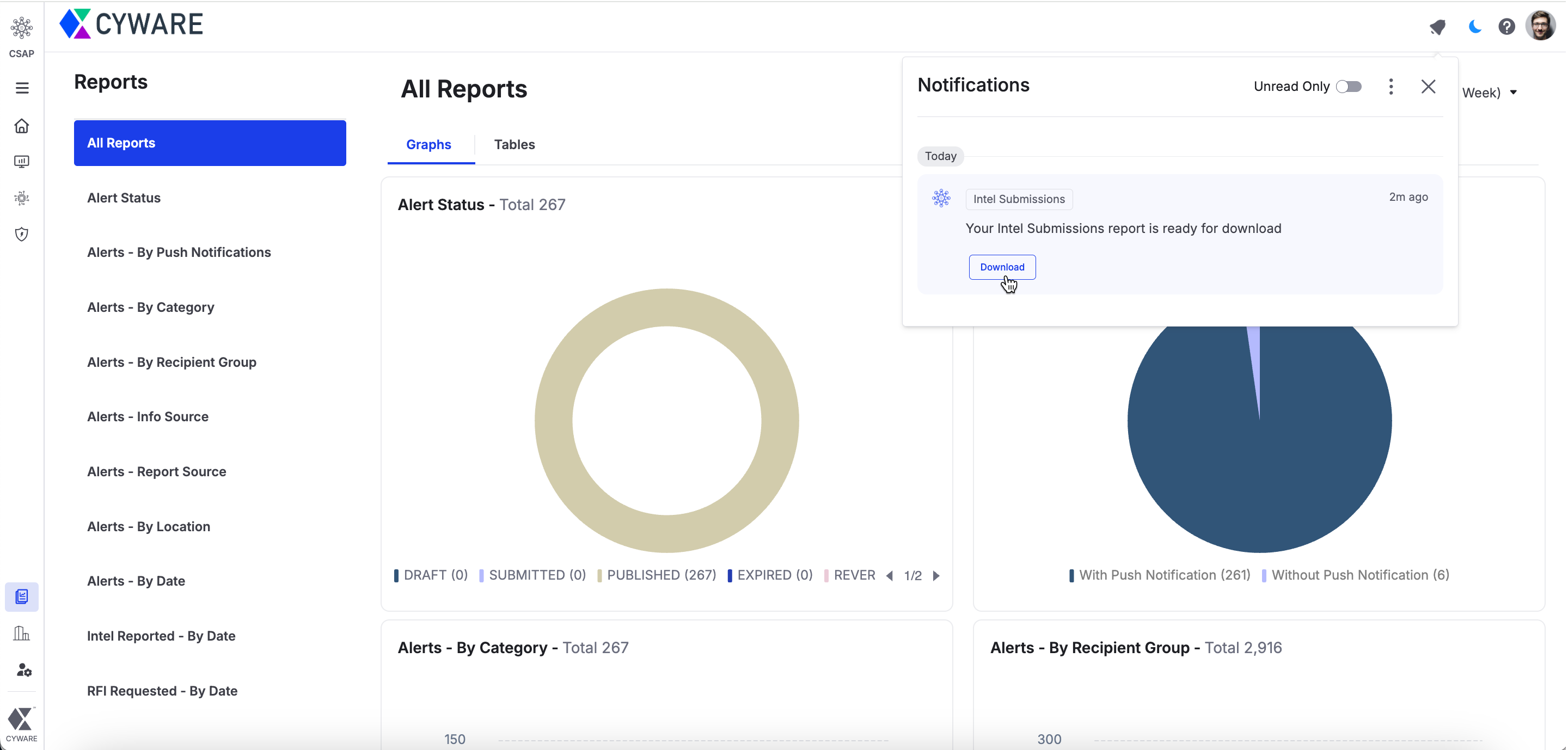
Download exports from notifications: After you export alerts, intel submissions, or reports, you will receive an in-app notification when the file is ready to download, allowing you to access it directly within the platform. For more information, see Manage Alerts and Manage Reports.
Manage API Access with CIDR range support: While generating API credentials for members, the Allowed IPs and CIDR Ranges field now supports IPv4 CIDR and IPv6 CIDR formats, enabling more flexible and secure API access controls. For more information, see Configure Collaborate Open API.
Notify alert publishers of RFI Responses: The publisher or creator of the alert from the Analyst Portal will now receive email notifications for RFI responses, while the member who submitted the RFI continues to receive notifications, ensuring real-time visibility into RFI activity. For more information, see Email Management.
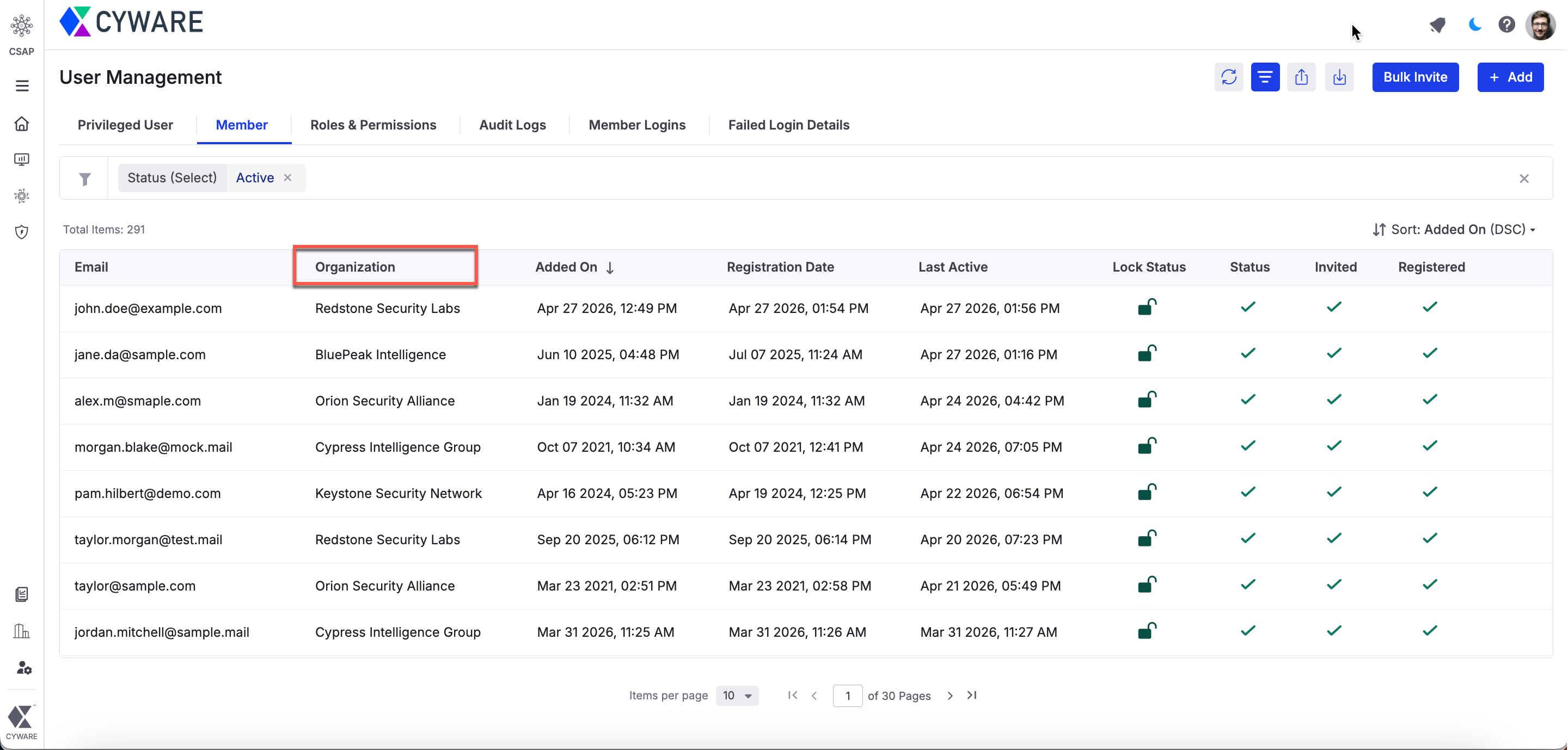
View member's organization in User Management: You can now view a member’s organization using the new Organization column in Administration > User Management > Member. This makes it easier to quickly identify the organization a member belongs to. For more information, see Manage Members.
Align placeholders in Alert Notification v2: While editing the HTML template in Settings > Other Settings > Email Management, you can now align the alert feedback, Mobile App CTA, and Unsubscribe Button placeholders to the left, right, and center, enabling better control over the email layout. For more information, see Settings.
Manage filter values in Member Portal: In Settings > Field Management, you can now control which values appear in Member Portal filters for Multi Select and Single Select fields by enabling the Show this value in Member Portal filters toggle. This gives you greater control over the filter options available to members. For more information, see Alert, Intel & RFI Custom Fields.
Member Portal
Download Doc Library folders: In Doc Library, you can now download a folder, including its sub-folders and files, as a single ZIP file. The folder structure is preserved within the ZIP file, making it easier to access related documents in one download. After the ZIP is ready, you’ll receive an in-app notification with the download option. For more information, see Manage Doc Library Files and Folders.
Manage API Access with CIDR range support: While generating API credentials, the Allowed IPs and CIDR Ranges field now supports IPv6, IPv4 CIDR, and IPv6 CIDR formats, allowing you to define more flexible and secure access controls for API requests. For more information, see Generate Open API Credentials.
Filter Documents by Tags: Tags filter is now available in the Doc Library, making it easier to filter documents and quickly locate the files you need. For more information, see Manage Doc Library Files and Folders.
Open API Enhancements
The following API is introduced:
Expire Alerts API ({{server}}csap/v1/expire-alerts/): New endpoint that allows Analyst Portal users to expire one or more alerts by passing a list of alert IDs. This supports bulk expiry of up to 100 alerts in a single request. For more information, see Expire Alert.
The following APIs are enhanced:
Create Alert API (
{{server}}csap/v1/create_card/): Enhanced to support scheduling alert expiry during alert creation using the scheduled_expiry_time parameter. This allows alerts to be automatically expired at a specified date and time. For more information, see Create Alert.Update Alert API (
{{server}}csap/v1/alert_update/): Enhanced to allow scheduling or updating the expiry date and time of an alert using the scheduled_expiry_time parameter. For more information, see Update Published Alert.Get Alert Details API (
{{server}}csap/v1/get_alert_detail/:short_id): Enhanced to return the following response parameters:scheduled_expiry_time: Returns the configured alert expiry date and time, allowing analysts to retrieve the scheduled expiry information for an alert.
shared_by: Returns the email, full name, and user ID of the member who submitted the intel published as the alert. This parameter is returned only when the Display Intel Submitter in Alert configuration is enabled in the Analyst Portal.
For more information, see Get Alert Details.