Automated Collective Defense
Notice
This feature is available in Collaborate v3.8.9.1 onwards and is only available for Cyware-based cloud deployments.
Automated Collective Defense (ACD) is a collaborative cybersecurity solution that harnesses automation to unite organizations in a collective defense against evolving cyber threats. Given the dynamic nature of these threats, individual organizations often struggle to keep pace. ACD leverages the capabilities of Information Sharing and Analysis Centers (ISACs) and Information Sharing and Analysis Organizations (ISAOs) to facilitate the efficient exchange and actioning of threat indicators on a larger scale, enabling effective and real-time threat defense.
Note
This feature must be enabled by your Collaborate administrator. Once enabled, you must accept the Services Agreement to proceed. For more information, see Manage Legal Terms.
How does it work?
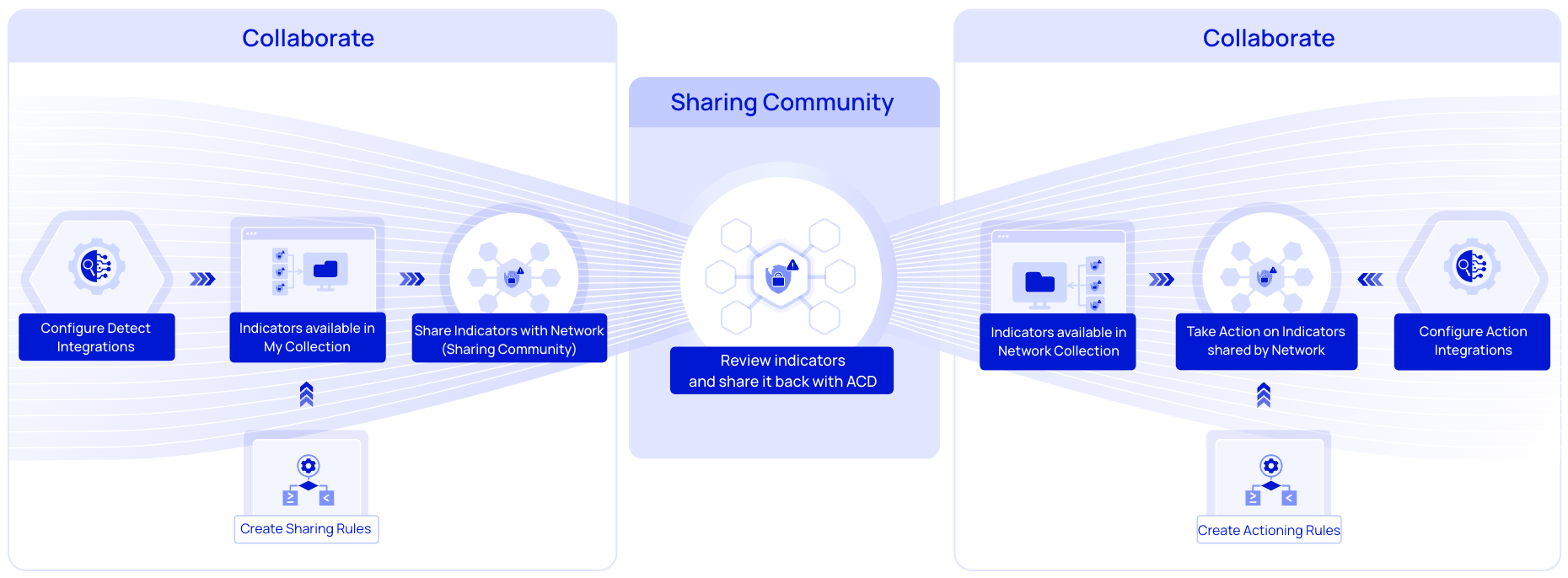
To ensure there is an automated flow of indicators in the collective defense, you must first configure integrations for detecting and acting on indicators and then set up automation rules. This enables indicators to be detected and actioned on within a fraction of the time. Alternatively, you can manually add indicators to your collection in the Intel Repository.
After indicators are detected, based on the automation rules, they are shared with the network (sharing community) where they undergo further analysis. Similarly, other members can also share indicators with the network. Based on the analysis of the sharing community, the indicators are shared with Collaborate and are available in the Network Collection for your action. If you have configured actioning integrations and rules, newly added indicators in the Network Collection are processed every five minutes according to the configured rules.
 |
What are the use cases of Automated Collective Defense?
Share real-time threat intelligence with sharing communities through automated processes. This helps in collectively identifying and responding to emerging threats more effectively.
Detect and respond to threats much faster by automating the flow of threat intel and integrating it with your detection and actioning systems.
Maintain a centralized repository for all your threat intel. This simplifies managing and sharing indicators of compromise (IOCs) and other critical threat data. Easily review threat intelligence within your network or community, ensuring that shared data meets your collective defense standards and is relevant to your organization.
What are the different sections of ACD?
The user interface of ACD consists of the following sections:
Intel Repository | Integrations | Automation Rules |
|---|---|---|
A repository that consists of indicators from various integrations, shared by the network, or added manually by you. For more information, see Manage Intel Repository. | Integrate third-party applications such as Splunk Enterprise, Microsoft Sentinel, Elasticsearch, IBM QRadar, and more to detect and take action on indicators. For more information, see Configure ACD Integrations. | Create rules to automate the flow of sharing and actioning on indicators in the Intel Repository. For more information, see Create Automation Rules. |