Release Notes 3.7.6 (Early Access)
January 29, 2026
We are excited to introduce you to the latest version of Intel Exchange v3.7.6.0 (EA). This release includes new features, enhancements, and minor bug fixes.
Cyware Intelligence Hub New
Cyware Intelligence Hub brings together Cyware-curated sector-specific threat feeds and selected third-party intelligence, such as Team Cymru, in a unified interface. This consolidated view helps you quickly understand relevant threats, monitor ransomware, malware, and botnets, and respond effectively based on your industry context. Cyware Intelligence Hub is included in the Cyware Intelligence Suite.
Note
Contact your Cyware sales or support representative to enable Cyware Intelligence Hub.
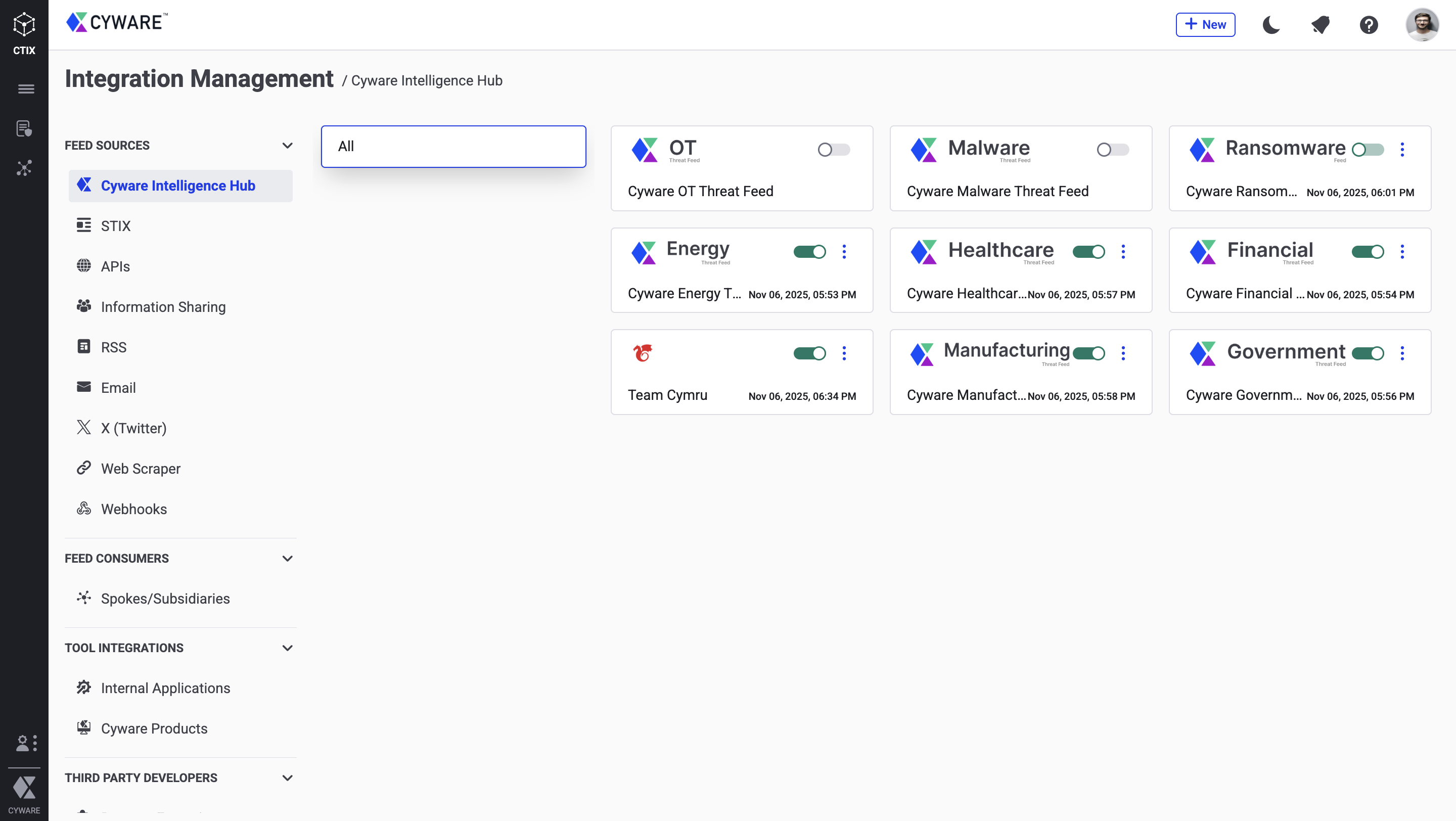
For more information, see Cyware Intelligence Hub.
AI Summary for Threat Data New
You can now generate an on-demand AI summary for threat data powered by Quarterback AI. This feature delivers a concise, context-rich overview by consolidating key fields from the threat data object and enriching them with AI-inferred insights. The summary is tailored to each object type, helping analysts quickly assess impact, understand relevance, and prioritize actions without manually reviewing multiple data points.
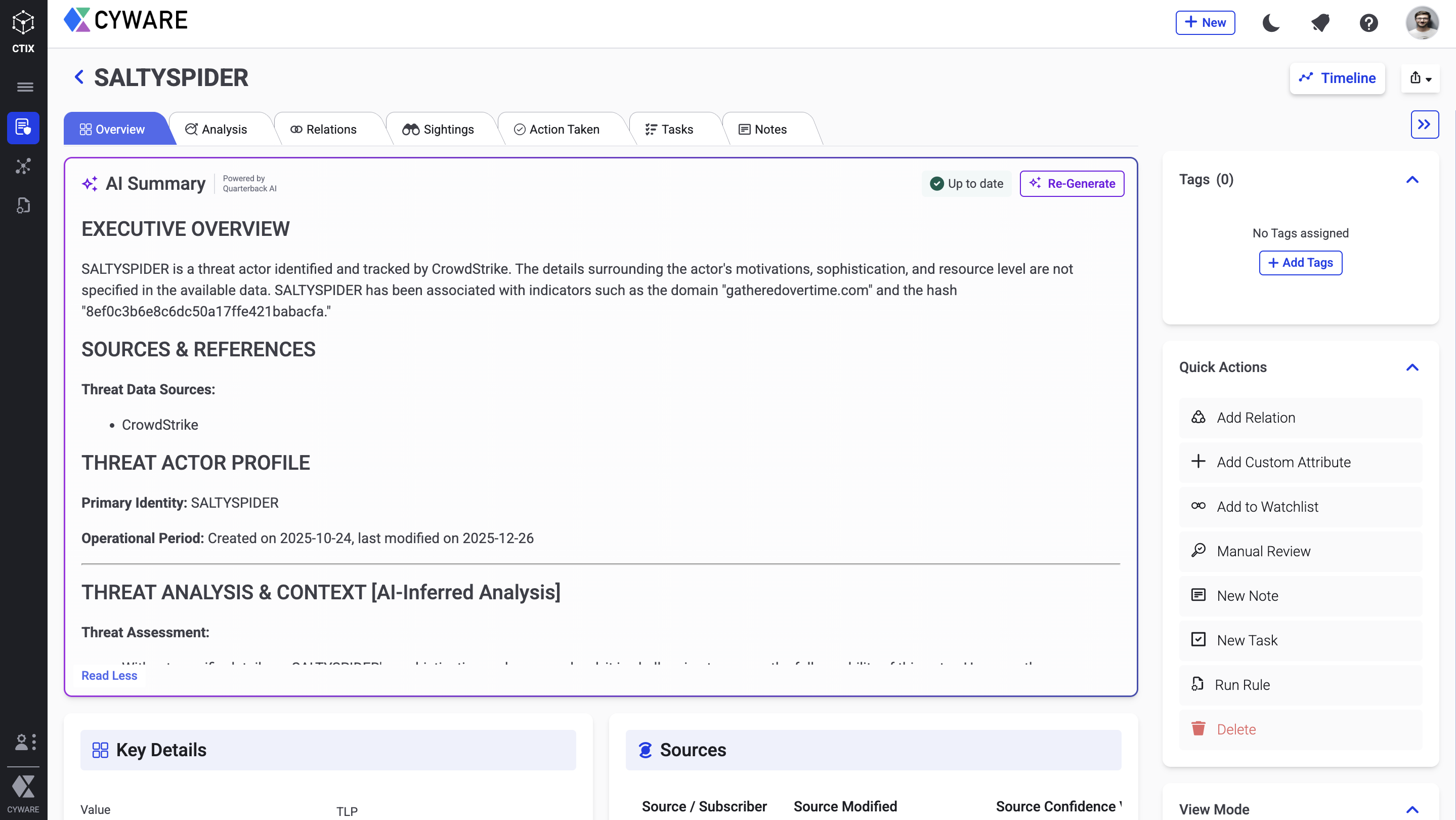
For more information, see Generate AI Summary.
CQL Enhanced
You can now use the following enhanced CQL capabilities to build more precise queries when filtering threat data. These updates improve query accuracy, performance, and ease of use.
Enhanced Query Logic: Added support for new operators such as ONLY IN, EXACTLY and MATCHES, along with a defined condition evaluation order where AND is evaluated before OR.
Expanded Parameter Coverage: Extended support for additional fields and parameters to enable more granular filtering across threat data.
Improved Value Handling: CQL now automatically handles URL values containing spaces and special characters, ensuring reliable query execution without requiring manual formatting.
Compound Query Enhancements: Compound queries that include enrichment or rule-related parameters are evaluated across all relevant threat data to provide consistent results.
For more information, see Understand CQL Grammar.
Watchlist Enhanced
You can now apply tags directly to Watchlist keywords. When incoming intel matches a Watchlist keyword, Intel Exchange applies the tags associated with that keyword to the matching intel, enabling consistent categorization and easier prioritization of relevant threats.
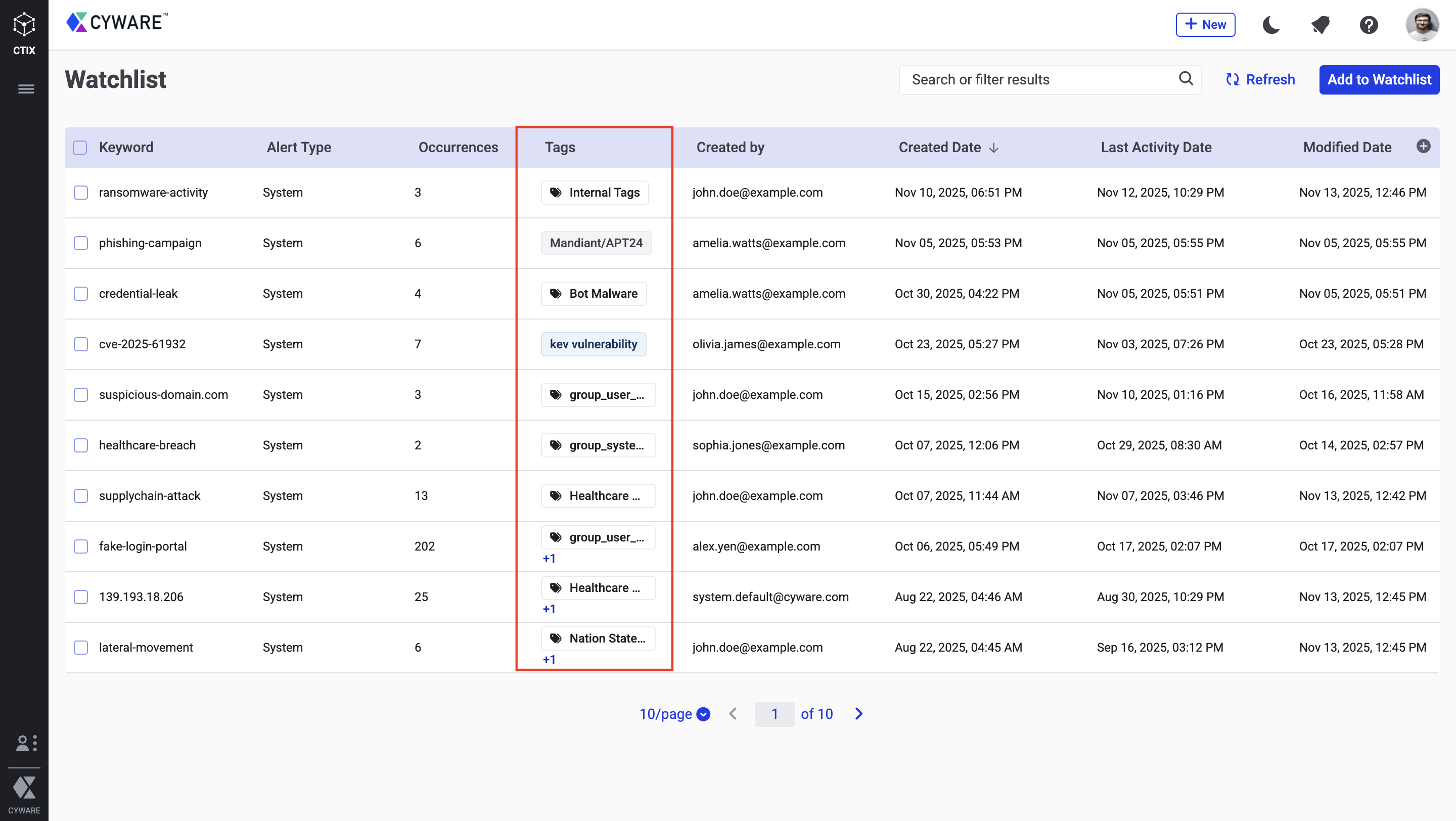
For more information, see Watchlist.
Cyware Advanced Threat Intel Crawler Enhanced
The Cyware Advanced Threat Intel Crawler browser extension is now also available through the Microsoft Edge Add-ons store, extending browser support for capturing threat intelligence from web pages and PDFs.
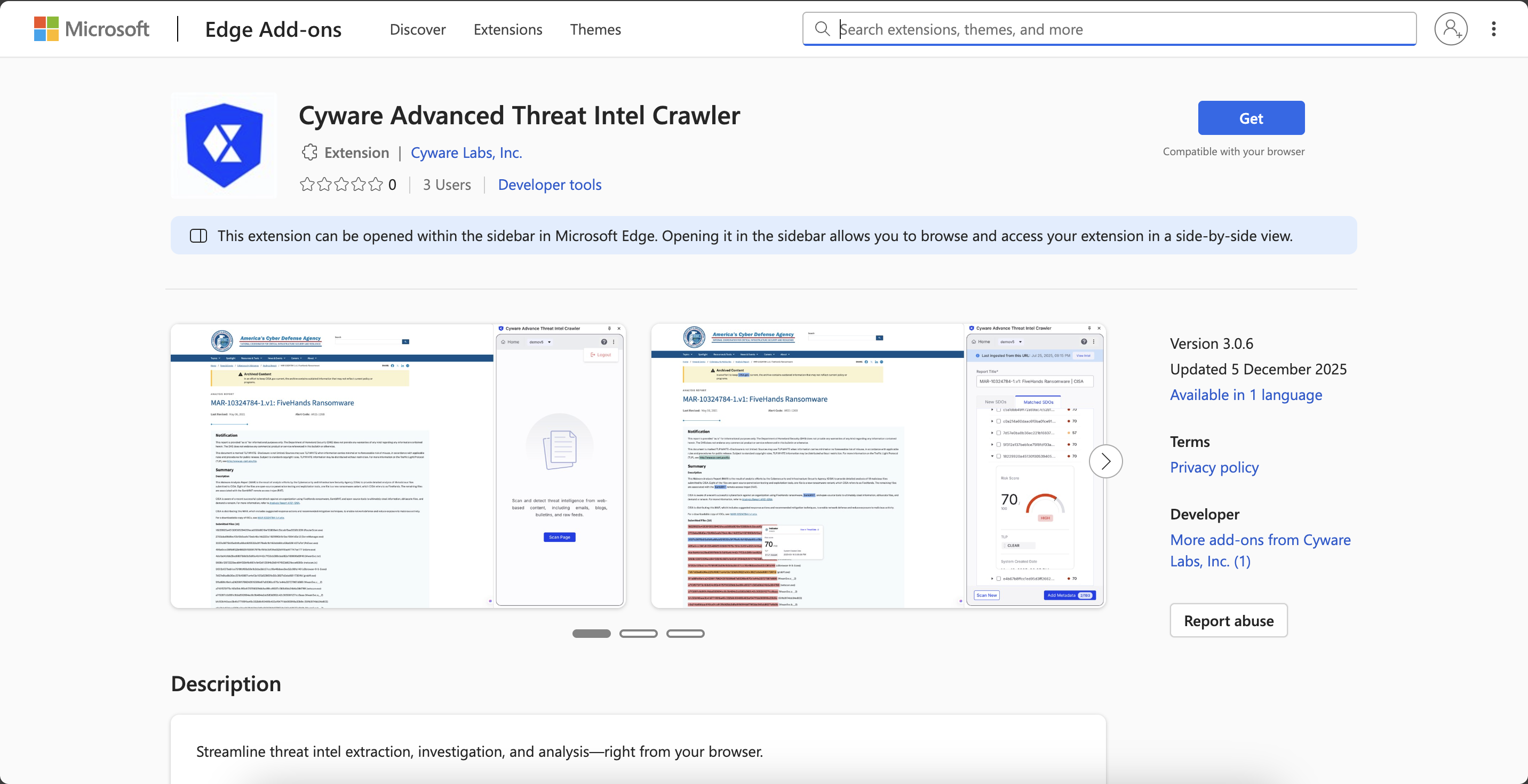
For more information, see Configure Cyware Advanced Threat Intel Crawler.
Other Enhancements
Automatic Valid Until Update for Deprecated Indicators: When an indicator is marked as Deprecated, Intel Exchange now automatically updates the Valid Until field with the current date and timestamp. This update also occurs when a rule executes the Deprecate action on an indicator, ensuring the Valid Until timestamp reflects the time of deprecation without manual updates. For more information, see Action on Threat Data Objects.
Subscriber Management: A new Last Successful Polled Date column has been added to Subscriber Management, enabling you to track exactly when the data was last polled successfully by that subscriber.
Default Read-only User Group Permissions: The default Read-only user group now includes new and updated permissions, providing expanded visibility across Intel Exchange. For more information, see User Groups Permission Set.
Threat Investigation Combo Mode: The Threat Investigation Canvas now supports Combo view, which groups related nodes of the same object type into a single consolidated node, reducing visual clutter and improving readability. For Indicators and Observables, Combo view includes an additional level of grouping based on IOC type, making related data easier to navigate.
Metadata Update for Default Tags Across Sources: Support for Default Tags has been extended to STIX, Information Sharing, Webscraper, and Webhook sources. This ensures consistent tagging of incoming intelligence across these ingestion flows.
Threat Data Activity Timeline: The Request for Older Data option in the Activity Timeline now allows you to retrieve and export a complete history of all actions performed on a specific object, making it easier to track changes and review past activity. For more information, see View Threat Data Activity Timeline.
Windows Registry Key Indicator Normalization: Intel Exchange now automatically normalizes path formatting for Windows Registry Key indicators during ingestion, ensuring consistent data representation across the system. For more information, see Quick Add Intel.
Notes Character Limit Increased: You can now add up to 25,000 characters in a single Note, enabling you to capture more detailed analysis. For more information, see Notes.
Added Object Support for Rule Actioning: The Select Object for Actioning option is now available for Campaign, Report, Grouping, and Note objects, enabling you to target specific threat data objects for automated rule actions. For more information, see Rules on Custom Objects.
Enhanced RSS Content View: You can now view the complete content of RSS feeds from the source page, including text, images, and links, directly within Intel Exchange, while still retaining access to the original feed link.
Watchlist Dashboard Enhancements: You can now view Watchlist widgets as threat data tables, giving you more granular control and flexibility when building PIR dashboards.
Integrations
This release includes new integrations and enhancements to existing integrations, improving functionality and expanding capabilities.
New
Google Threat Intelligence (GTI) (API Feed Source): Integrate with GTI to provide enriched threat intelligence, offering contextual insights and relationships across multiple threat domains to support proactive detection and mitigation. For more information, see Google Threat Intelligence.
Vilocify (API Feed Source): Retrieves intelligence on vulnerabilities, including available software fixes and severity scores, to help organizations prioritize and remediate security risks. For more information, see Vilocify.
BAE Systems (API Feed Source): Ingests proprietary threat intelligence via API to bolster detection and investigation workflows with high-fidelity indicator data and actor insights. For more information, see BAE Systems. For more information, see BAE Systems.
Censys (Enrichment Tool): Retrieves intelligence on IP and Domain indicators to provide actionable insights into network infrastructure. This integration helps organizations identify and analyze global internet-facing assets. For more information, see Censys.
Google Threat Intelligence (GTI) (Enrichment Tool): Enriches domains, IPs, URLs, hashes, and vulnerabilities with contextual threat intelligence from GTI, helping analysts understand the relevance, severity, and relationships of the enriched indicators. For more information, see Google Threat Intelligence.
Enhanced
MISP (API Feed Source): Added Filter and Value fields to the feed channel configuration to enable targeted polling. This ensures only relevant events are ingested based on specific filtering criteria. For more information, see MISP.
Microsoft Defender Threat Intelligence (MDTI) (API Feed Source): Added a new Fetch Intel Profiles feed channel to retrieve intelligence from broader sources and expand threat collection capabilities. For more information, see Microsoft Defender Threat Intelligence (MDTI).
LevelBlue Labs (API Feed Source): Renamed the AlienVault integration to LevelBlue Labs and implemented internal optimizations to improve data ingestion and workflow alignment. For more information, see LevelBlue Labs Open Threat Exchange.
FortiRecon (API Feed Source): Updated the integration to support the latest API endpoints, ensuring more efficient ingestion and improved processing of threat intelligence data. For more information, see FortiRecon.
GreyNoise (API Feed Source): Updated to version 3 to ensure compatibility with the latest GreyNoise APIs, providing more efficient intelligence retrieval and improved data consistency. For more information, see GreyNoise.
Flashpoint Ignite (API Feed Source): Overhauled the integration to support the latest API endpoints for improved performance and stability. For more information, see Flashpoint Ignite.
CrowdStrike (API Feed Source): Renamed the Confidence Score Threshold field to Filter IOCs by CrowdStrike Confidence Level in the indicator feed channel configuration to improve data alignment and consistency. For more information, see CrowdStrike.
DomainTools (Enrichment Tool): Added support for bulk enrichment, enabling the enrichment of multiple indicators in a single operation to improve investigation efficiency. For more information, see DomainTools.
URLScan (Enrichment Tool): Updated the integration to remove support for domain enrichment and Threat Investigation capabilities. For more information, see urlscan.io.
GreyNoise (Enrichment Tool): Updated to version 3 to enable enrichment using the latest GreyNoise APIs, providing improved accuracy and broader intelligence coverage for indicators. For more information, see GreyNoise.